How to Follow MLB Without Spoilers — Hide Final Scores Until You Watch
You recorded the game. You made it to the couch. And somewhere between the parking lot and the remote, a widget told you who won.
This is the single most annoying thing about following baseball on a delay, and it gets worse in October — four games a day, most of them starting while you are at work, on a schedule set for a time zone that isn’t yours.
Baseball NUT has a switch for it. Turn on Hide Final Scoresand every final and in-progress score is masked until you choose to see it. Everything else — standings, stats, schedules, player pages — keeps working normally.
Turn it on in two taps
1. Open Settings — the gear icon in the top corner of any page.
2. Switch on Hide final scores.
That’s it. The setting sticks on that device until you turn it off, so you don’t have to remember to re-arm it before every game.
What actually gets hidden
Masking a score is easy. Masking everything that impliesa score is the hard part, and it’s where most attempts leak. With the toggle on, a finished or in-progress game hides:
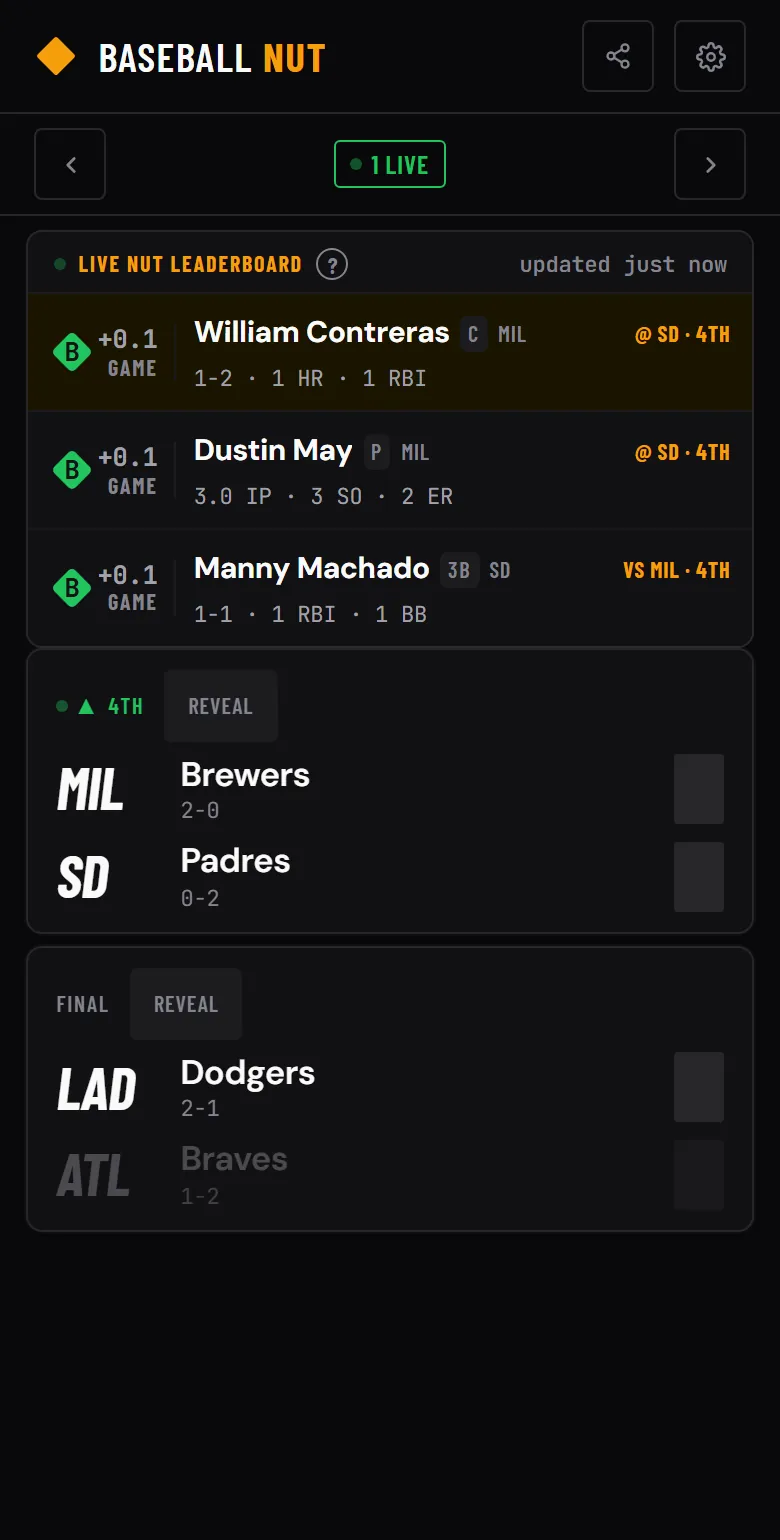
· The score itself — covered, not just dimmed, and not selectable, so you can’t reveal it by dragging across the card.
· The inning-by-inning strip, which would show you exactly where the runs landed.
· The live base diamond and the current inning.
· The result tag — labels like “Steady Win” or “Late Rally” describe the shape of a game you haven’t seen.
· The series line. This one is subtle: “NYY leads series 2-1” tells you who won last night as surely as the box score does.
· The scrolling leaderboard ticker, which carries yesterday’s standout performances — a pitcher with 11 strikeouts is a spoiler with extra steps.
Upcoming games are left alone. There is nothing to spoil about a game that hasn’t started, so the schedule, probable starters and matchup previews all stay visible.
Reveal one game at a time
Spoiler mode isn’t all-or-nothing. Every masked card has a Reveal button, and tapping it uncovers that game and only that game.
This is the normal way to use it. You are behind on your own team but perfectly happy to see how the wild card race moved — reveal those, leave yours covered. Then, once you’ve watched, reveal your game and the full box score, game NUT scores and play-by-play are right there.
The other leaks, and what to do about them
Being honest about scope: this setting controls Baseball NUT. It cannot stop the rest of your phone from ruining the game for you. The usual culprits, in rough order of how often they get people:
· Notifications from other sports apps. Worth muting for the evening — a lock-screen alert is unskippable.
· Social feeds. Baseball is the fastest-moving thing on a timeline during the postseason.
· Your streaming app’s own thumbnails, which sometimes label a recording with the final score.
One thing you don’t have to manage: Baseball NUT doesn’t send push notifications at all, so there is no alert setting to hunt down and no chance of a score arriving unrequested.
Why this exists
Most scoreboards are built on the assumption that you want the number as fast as possible. That is the right default for most of the season and exactly wrong on the nights you care most — the ones you planned around, recorded, and sat down to actually watch.
The app already leaves out the things that make scoreboards stressful: no ads, no gambling odds, no autoplay video. Letting you decide when you learn the score belongs in the same category.
Scores, standings and the full NUT board are at baseballnut.app— free, no account needed, and quiet when you ask it to be.