How to Use Baseball NUT: A Complete Guide
Baseball NUT is a free MLB app built for people who just want to follow the game — no ads, no gambling odds, no clutter. This guide walks through every feature so you can get the most out of it.
Scores
The scoreboard is your home screen. It shows every MLB game for the day with live scores, inning, count, base runners, outs, and team records — updated every 30 seconds automatically. Next to each team's record is a color-coded streak chip — green for a win streak, red for a skid (W5, L3) — so you can see who's hot at a glance. The same chip shows on the game detail page.
Each live card shows both teams' chance to win beside their scores. Tap the arrows in a live card's corner to follow that game pitch by pitch in full screen; closing it brings you back to the scoreboard.
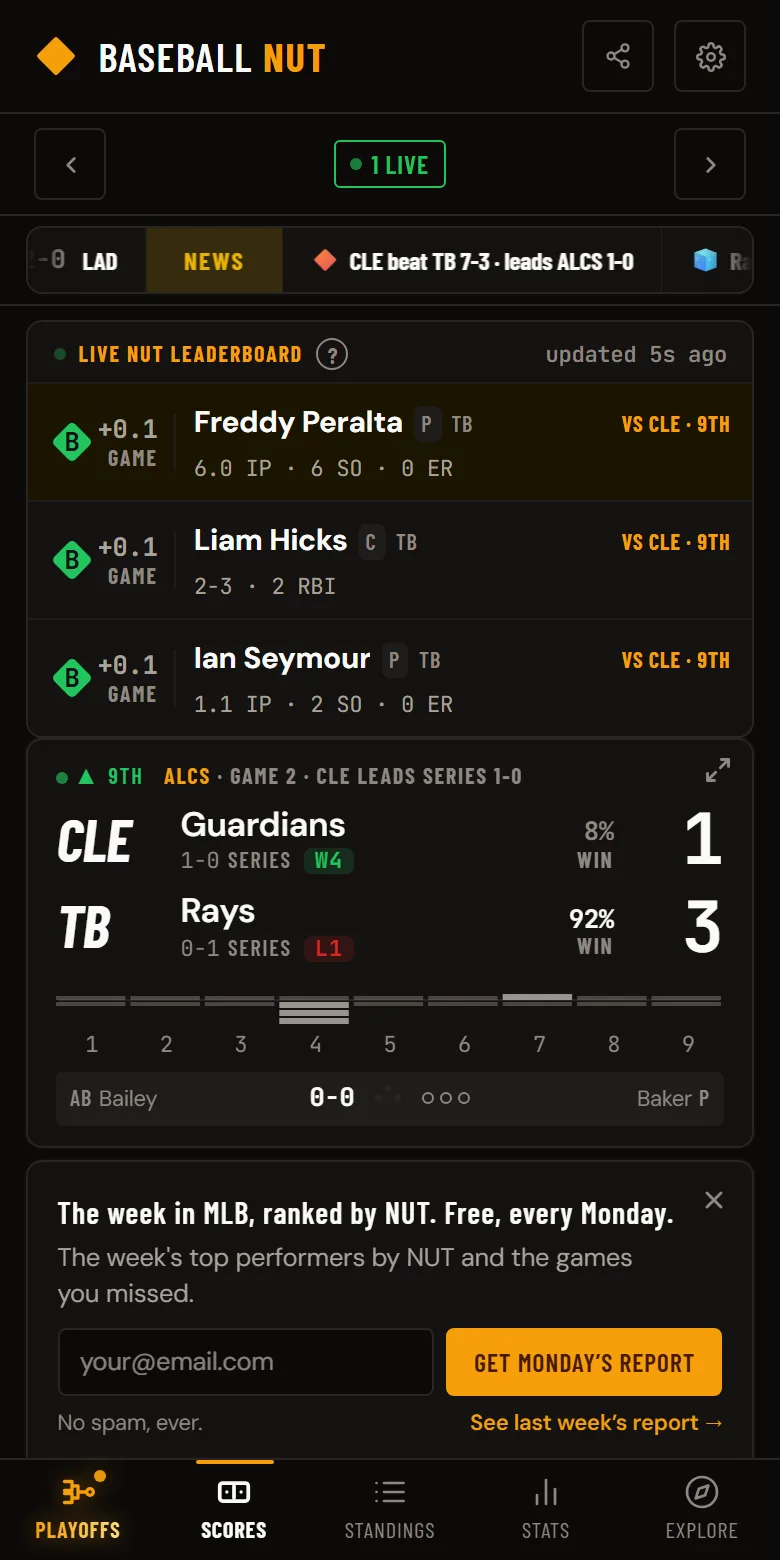
During live games, each card also shows the current pitcher, batter at the plate, and the ball-strike count — so you can follow the action without opening the full game view.
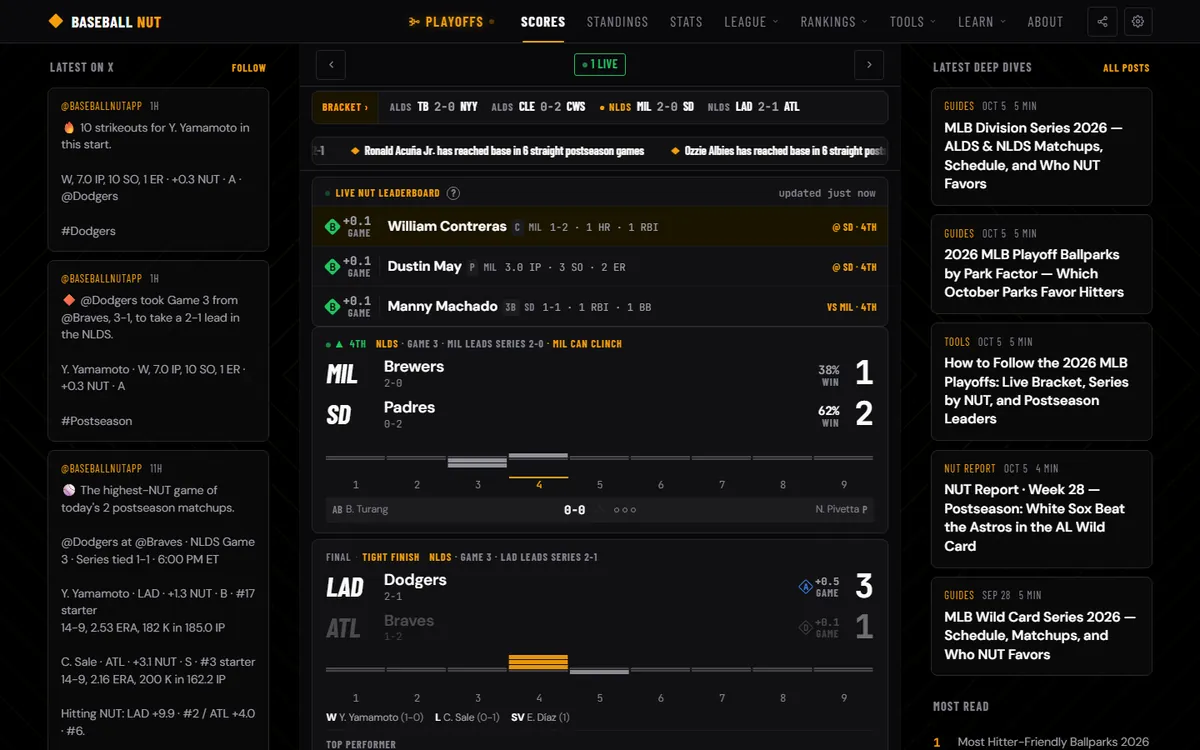
Use the arrows at the top to navigate between days, or tap the date to jump to any specific date. On mobile, you can also swipe left or right on the scoreboard to move between days. If there are live games, you'll see a green "LIVE" badge with a count of how many games are in progress.
Tap any game card to open the full game detail page with the box score, play-by-play, win probability, and top performers by NUT Score. At the bottom of every matchup card, you'll find a quick link to compare the two teams side by side.
On mobile, pull down from the top of the scoreboard to manually refresh scores. A floating scroll-to-top button also appears when you scroll down on longer pages.
Pinned at the top of the scoreboard is an auto-scrolling NUT ticker that stays visible while you scroll through the day's games. Every value matches the stats and standings pages exactly — no separate calculations. Each section header is gold and clearly labels what you're looking at:
- Playoffs — in October, leads the ticker: every series still being played, the live one marked; tap one to open the bracket
- News — the newest results, series stakes, streaks, and milestones from the last 24 hours; tap one to open it
- Yesterday's Top NUT — single-game NUT leaders from the previous day's slate, with their stat line
- Top Hitting NUT — players — top 5 hitters by season NUT
- Top Pitching NUT — players — top 5 pitchers by season NUT
- Top Hitting NUT — teams — top 5 teams by team batting NUT
- Top Pitching NUT — teams — top 5 teams by staff NUT
- Top Overall NUT — teams — top 5 teams by combined hitting + pitching NUT
- Notable Team Streaks — longest active win/loss runs, wins listed first then losses, each with a 10-game W/L bar showing the streak in context (full-opacity dots are the active streak, dimmed dots are older games)
Below the ticker is a mode-aware module that changes throughout the day depending on the slate's state:
Before First Pitch — NUT Matchups on Every Card
Every upcoming game's card carries its matchup NUT — one composite score for how strong the pitching and hitting on both sides are:
matchup NUT = 1.5 × (away SP + home SP) + (away team bat + home team bat)
On days with 4 or more games, the top-ranked game gets a starred amber header: ★ MARQUEE NUT MATCHUP when at least one probable starter grades A (Great) or better on season NUT, ★ TOP NUT MATCHUP otherwise. On 1–3 game days, like the LCS and World Series, there's no marquee: picking the better of two games isn't a real ranking, so every card just shows its matchup NUT.
Every other card shows its matchup NUT at the end of its header line, so the whole slate's ranking reads at a glance. The marquee card adds a Top hitters toggle: each team's five best hitters by season NUT, side by side, each headed by its Team Bat (the sum of every qualified hitter on the roster). These are the best hitters on the active roster, not the announced starting lineup, which MLB posts only an hour or two before first pitch. Anyone on the injured list is excluded, and the list runs short of five rather than padding it with below-average bats. Because Team Bat covers the whole roster, it reads higher than the five names beneath it.
During Live Games — Live NUT Leaderboard
The moment any game tips off, a Live NUT Leaderboard appears, showing the top 5 single-game NUT performances happening right now across all in-progress games. It refreshes every 30 seconds, with each row showing player, team, current stat line, opponent, and the inning the game is in. A small "updated Xs ago" indicator ticks every 5 seconds.
After All Games Final — Standout NUT Performances
Once every game on the date is final (or terminal-special-status like postponed), the live leaderboard is replaced by ★ Standout NUT Performances— a recap card listing the day's top 5 single-game NUT scores. Each row links straight to that player's profile.
Each final game card also shows each team's NUT beside its score — a quick read on how impactful each side was at the plate and on the mound. Add the two together to get the game's Total NUT.
Under the team rows, every live and final card displays a full-width inning bar chart, numbered 1–9 — away team runs above the baseline, home team runs below, one column per inning. It's an at-a-glance read on how the scoring unfolded: a single tall column means a big inning, alternating bars mean a back-and-forth game. On live cards, each team's win probability sits beside its score so you can see momentum without opening the game.
Every final game card picks up a narrative tag in the status row to summarize the story of the game:
- PERFECT GAME — pitcher faced 27 batters, retired all 27
- NO-HITTER — winning team allowed zero hits
- WALK-OFF — home team won by scoring the go-ahead run in their last at-bat
- MARATHON — game went 12 or more innings
- EXTRAS — game went 10 or 11 innings
- COMEBACK — winner trailed by 4 or more runs at some point
- BLOWOUT — winning margin of 7 or more runs
- SHUTOUT — the losing team didn't score
- PITCHERS' DUEL — winner scored 3 or fewer runs and the teams combined for 12 or fewer hits
- SLUGFEST — combined 18 or more runs
- BIG INNING — the winning team scored 4 or more in a single frame
- MULTI-HR — a single hitter went deep 2 or more times
- SEESAW — three or more lead changes
- LATE RALLY — winner took the final lead in the 7th inning or later
- TIGHT FINISH — a save closed out a close game — margin of 2 runs or fewer
- NAIL-BITER — final margin of 1 or 2 runs
- WIRE-TO-WIRE — winner scored first and never trailed
- RALLY — winner overcame a deficit of 2+ runs, was still trailing past the early innings, and won by 4 runs or fewer
- STEADY WIN — fallback when no other tag applies
Each game gets the most specific tag that fits — a walk-off comeback shows WALK-OFF rather than COMEBACK because the dramatic finish is the bigger story.
On a day with no games, the scoreboard shows that day's NUT Check: the puzzle number, the question, and your score or day streak, with one tap to play.
Every game page has its own Box Score tab, with each player's game NUT on every line. Want every game from one day at once? Box Scores puts every final from a date on one page: the line score, then each team's batting and pitching lines, and the day's top 5 performances up top. Hide Final Scores works there too.
Game Detail
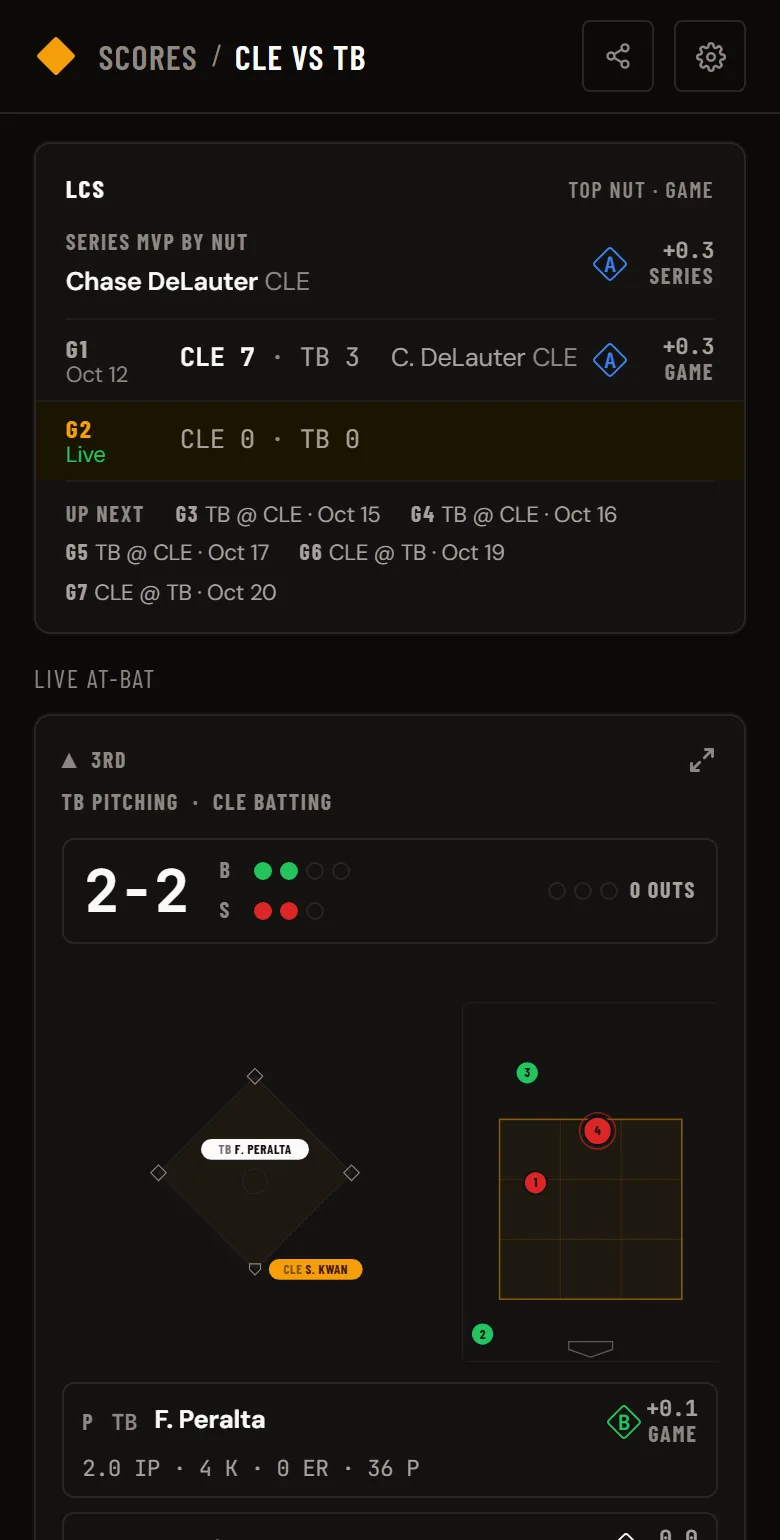
Tapping a game card opens the expanded view. What you see depends on the game state:
Following a game you can't watch? See how to follow an MLB game live, pitch by pitch.
Before the Game (Preview)
- Start time in your local timezone
- Probable starting pitchers with season records
- Win probability based on team records
- Venue, weather, and series context
- A game preview highlighting storylines, matchups, and what to watch for
- Batter vs pitcher career matchup history for both lineups against the opposing starter
During the Game (Live)
- Live score with base runners, outs, and count
- Current pitcher vs. batter matchup
- Win probability chart — full game line chart showing momentum swings with the biggest play highlighted
- Line score updated every 15 seconds
- Score change animations — numbers flash when a team scores
- Full play-by-play as it happens
After the Game (Final)
- Final score with winning/losing/save pitchers
- Game Recap — the story of the game, the turn, and the standout
- Win probability chart with biggest play highlighted
- Top 3 performers ranked by NUT Score
- Complete box score (batting and pitching lines)
- Full play-by-play with win probability on each play
- Series result (who won the series or if it was split)
Favorite Teams
Go to Standings and tap the star next to any team name to favorite them. You can also favorite a team from their team page. You can favorite multiple teams.
Your favorite teams automatically pin to the top of the scoreboard with a highlighted border, so you never have to scroll to find their games. If a favorite team is playing live, their card gets an extra-prominent outline.
Standings & Team Pages
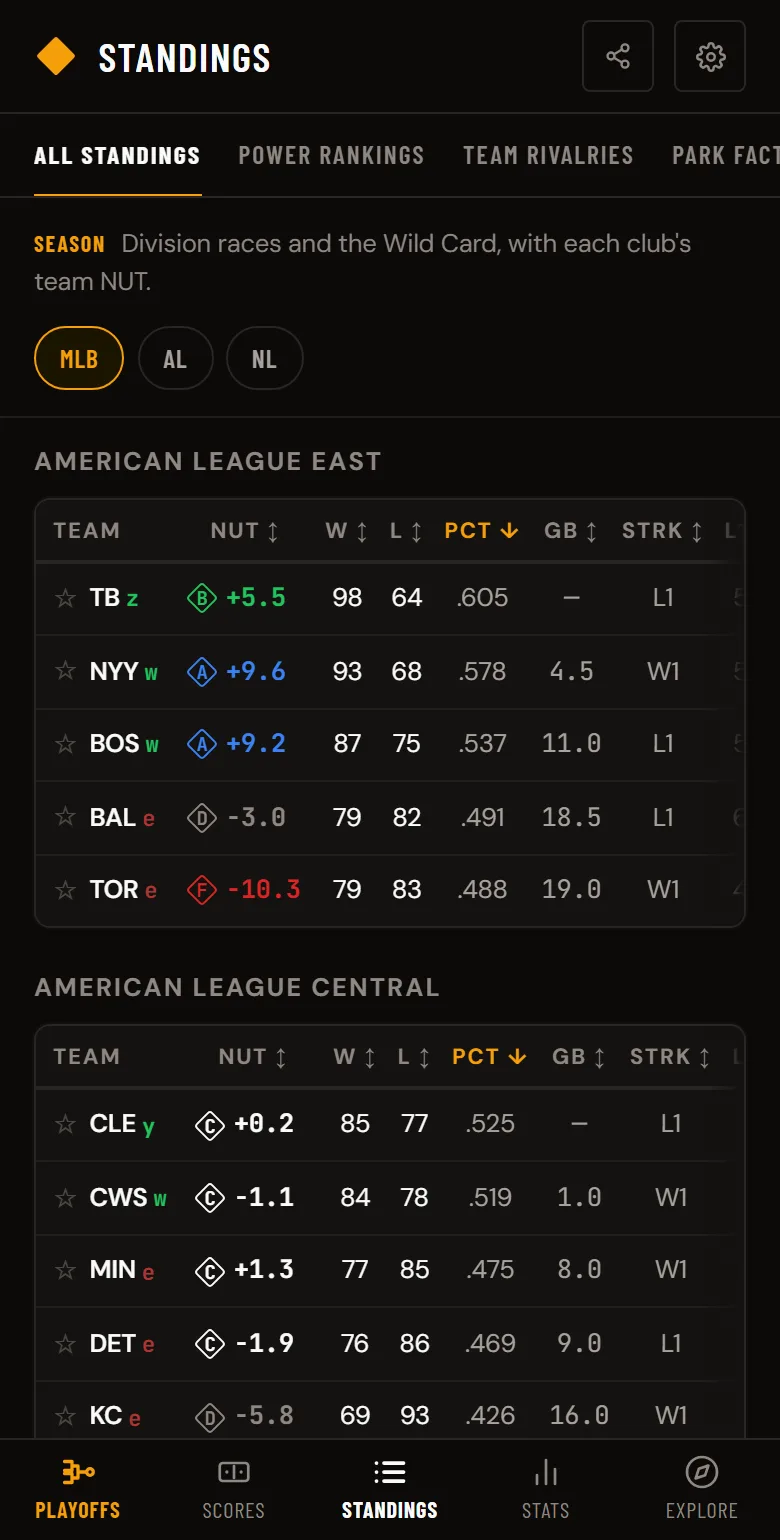
The Standings page shows every MLB division with win-loss records, games back, winning percentage, NUT team rankings, and expected wins-losses (xW-L) based on Pythagorean expectation. The xW-L column shows whether a team is winning more or fewer games than their run differential suggests — green means they're overperforming (winning more than expected), red means they're underperforming (winning fewer than expected). Each team also shows a magic number (M#) to clinch the division and an elimination number (E#) — both update as the season plays out. Once a team clinches, a green letter appears after its name (z bye, y division, w wild card, x playoff spot), and a red e marks a team out of playoff contention. Wild card standings are visible beneath each division tab so you can track the full playoff picture from one screen. Toggle between AL, NL, or MLB to see both leagues ranked together.
Power Rankings ranks all 30 clubs by season team NUT, with a bar for hitting NUT on the left, pitching NUT on the right, each club's grade, and a 7-day trend arrow. Filter by AL, NL, or all of MLB.
Tap any team to open their full team page. The bio card up top shows the team's record, division standing, championships, and a Season NUT badge with their tier (S Nutty / A Great / B Good / C Average / D Weak / F Bad), Hit/Pitch breakdown, and a sparkline of monthly NUT so you can see whether the team is trending up or down through the season at a glance. A live game line tells you when the team is playing right now (or what their last game was) — tap it to open that game. Below the badge, a single meta-line shows Win %, Run Differential, current streak, and Last 10. Below the bio: five tabs of deep analysis:
Season
Team Overview gives you a quick strength, weakness, and outlook for the team. Below that, Quick Stats show key batting and pitching numbers with All/Last 7D/Last 14D/Last 30D filters and the team's aggregate NUT score — so you can see if a team is hot right now vs. their season average. Actual vs Expected compares the team's real record to their Pythagorean record (expected wins based on runs scored vs. allowed) — if they're overperforming, they may be due for regression. Percentile Rankings show where the team ranks among all 30 MLB teams for every key stat, with color-coded bars so you can spot strengths and weaknesses at a glance. Hitting is grouped into five sections — Value (OPS, NUT, wOBA, xwOBA), Production (AVG, xBA, OBP, SLG, xSLG, ISO, HR, R), Discipline (BB%, K%, SwStr%, Contact%), Approach (Swing%, P/PA), and Speed (SB, Sprint Speed). Pitching is grouped into three sections — Value (ERA, NUT, ERA-NUT, FIP, xFIP), Run Prevention (WHIP, BAA, HR/9, LOB%), and Stuff (K%, K/9, Whiff%, BB%, BB/9, K-BB%, Strike%). ABS Challenges shows the team's automated ball-strike challenge record — how often they've challenged an umpire's call and how often the challenge was upheld, both for and against. Hot & Cold highlights the team's top NUT performers over the last 7 days.
Trends
Rolling 10-Game NUT is a line chart with green/red area fills showing the team's performance trajectory — when the line is above zero and green, the team is producing above-average NUT; red means below average. Toggle between total, hitting, and pitching. NUT by Month shows centered bars for each month — green bars extend right for positive months, red bars extend left for negative ones. Below that, Year by Year gives the full season-over-season stats table with a NUT Trend sparkline showing how the team has performed historically.
Splits
See how the team performs in different situations — Home vs. Away, Wins vs. Losses, Day vs. Night, and by month. Every split includes a NUT column so you can see where the team generates the most (or least) value. The NUT comparison cards at the top give you an instant visual of the biggest splits. Plate Appearance Breakdown shows the team's batted ball distribution with K%, BB%, BABIP, and GO/AO ratio. The vs Opponent table shows the team's record, run differential, and key stats against every team they've faced.
Roster
The Depth Chart shows the active roster grouped by position — starters, relievers, catchers, infielders, outfielders, DH — with key stats for each player. Injured list players are grouped by IL type. Below that, Pitch Arsenal breaks down every pitcher's pitch mix with usage percentages, average velocity, and color-coded bars — so you can see at a glance that a starter throws 40% fastballs at 96 mph and 25% sliders at 87 mph. Starters and bullpen arms are shown separately.
Schedule
A monthly calendar heatmap shows game NUT scores color-coded by quality, with W/L bars at the bottom of each cell. Below the calendar, games are grouped by series with opponent records, scores, and probable pitchers for upcoming games.
Playoffs
From the end of the regular season through the World Series, a Playoffs tab leads the navigation. The Playoff Bracket shows all twelve seeds from the Wild Card round to the World Series, with each series score and each team's regular-season NUT grade. On a phone, switch between the AL, NL, and World Series tabs; on a desktop, the whole bracket fits on one screen. Tap any series to open its next game. Below the bracket, Series by NUT lists every open matchup with both teams' season NUT and which side holds the edge.
During the postseason the ticker at the top of the scoreboard leads with every series still being played, and each game card names its round and series standing (ALDS · Game 3 · TOR leads series 2-1). When a game can end a series, the card and game page say so: Winner take all or NYY can clinch. A postseason game page also lists every game of its series, each with its score and top NUT performer. To see who's producing in October, pick Postseason under Filters in Stats, for players or teams.
Player and team pages add a Postseason card once they play in October: postseason NUT and a stat line for players, and the current round, series score, next game, and postseason NUT for teams. In Standings, the playoff-odds column becomes POST, showing each club's October status: In WC, Bye, Lost DS, Champion, or Out. On a postseason game page and on Compare, a Regular Season | Postseason toggle switches every stat (NUT, AVG, OPS, HR, the starters' ERA) to October numbers, Wild Card included.
Stats
The Stats page is a full MLB leaderboard. You can browse leaders for every major statistical category:
- Hitting: NUT, R, H, 2B, 3B, HR, RBI, BB, SO, SB, AVG, OBP, SLG
- Pitching: NUT, W, L, ERA, SV, IP, SO, BB, WHIP, Holds, Blown Saves
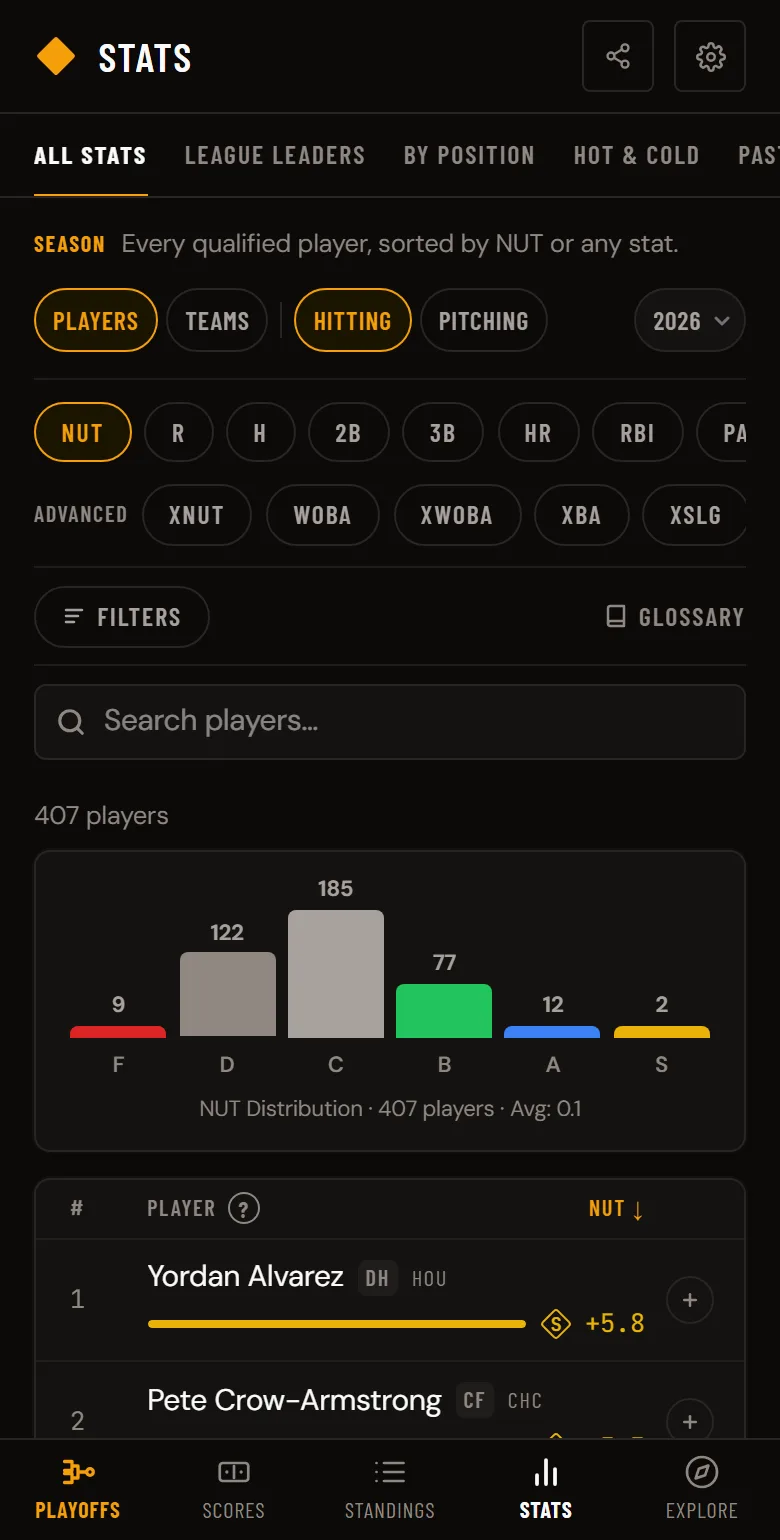
Toggle between Players and Teams, Hitting and Pitching. Use the search bar to find any player by name. For deeper filtering, tap the Filters button to narrow by date range (Season, Last 7D, 14D, 30D, or Custom), league (AL/NL), division (East, Central, West), position, or pitcher role (SP/RP). Active filters show as tags next to the button, and you can clear them all with one tap.
A results count above the leaderboard updates as you filter — so you always know how many players or teams match your current view.
The NUT leaderboard shows every player with at least 1 plate appearance or 1 inning pitched, so you can watch NUT accumulate from the very first game of the season.
Player Profiles
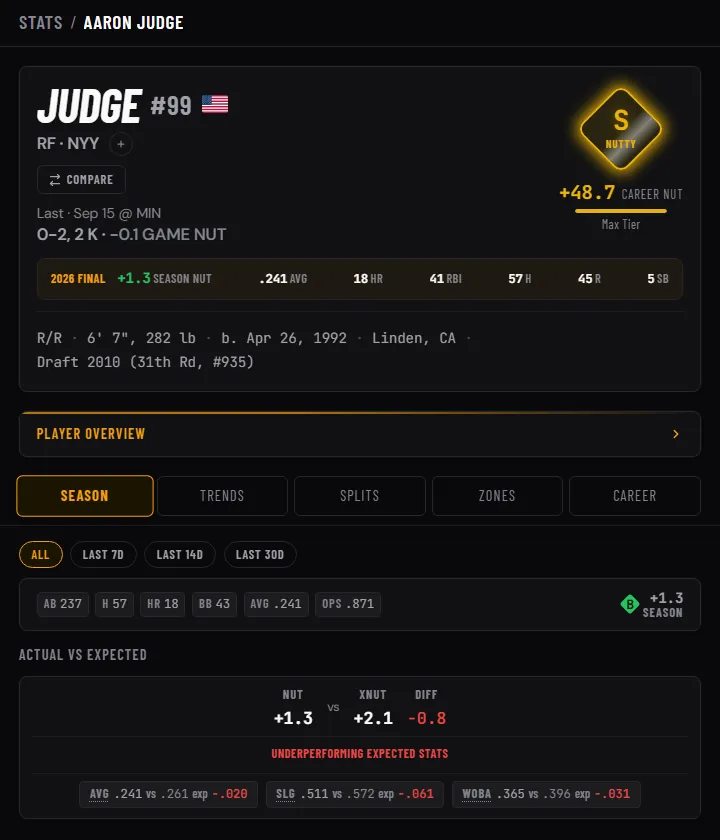
Tap any player name anywhere in the app to open their full profile. The bio card up top shows their jersey number with their country flag alongside, position and team, plus a Career NUT badge with their tier (S Nutty / A Great / B Good / C Average / D Weak / F Bad), total, and a sparkline of season-by-season NUT so you can see their career arc at a glance. A live game line tells you when the player's team is playing right now (or what their last game was) — tap it to open that game. A baseball-card style stat block below shows handedness, height/weight, birthplace, and how they entered pro ball — each fact labeled and grouped like a card back. Below the bio: five tabs of analysis:
Season
Quick Stats show the player's key numbers with All/Last 7D/Last 14D/Last 30D filters and a large NUT badge — use this to check if a player is hot right now vs. their season baseline. In the profile header, On Pace For projects the player's production to the end of the current season — extending their current rate across the games left on the schedule, so a midseason call-up is projected over his realistic remaining games rather than a phantom full 162 — showing where they're tracking for NUT, HR, RBI, SB, and runs. Actual vs Expected compares the player's real NUT to their expected NUT (xNUT for hitters uses quality of contact; ERA NUT for pitchers uses fielding-independent stats). If xNUT is higher, the player is underperforming their batted-ball quality — the verdict reads "Underperforming expected stats." If it's lower, they've been overperforming — "Outperforming expected stats." When they match, it reads "Matching expected stats." Percentile Rankings show where the player ranks among all MLB players in key categories with color-coded bars — gold for 90th+ percentile, green for 60th+, gray for average, red for below 40th.
Trends
Cumulative NUT shows total NUT accumulation across the season as a line chart with area fill — each dot is a game, colored green (positive NUT) or red (negative). The 7-Game Rolling NUT chart uses green/red area fills split at the zero line to show recent trajectory — when the line is in the green zone, the player is contributing above average. NUT by Month shows centered bars so you can see which months the player carried the team. The Game Log table lists every game with opponent, stat line, and NUT — filter by All, Last 7D, Last 14D, or Last 30D.
Splits
Breakdowns for vs Left/Right handed pitchers, Home/Away, Win/Loss, Day/Night, by pitch count, runner situations, leverage (high/medium/low), monthly, and career. Every split shows full stat lines — for hitters: PA, AVG, OBP, SLG, OPS, HR, BB, SO; for pitchers: IP, ERA, WHIP, AVG, SO, BB, HR. Platoon splits are essential for evaluating lineup matchups.
Zones
Strike Zone Heatmap shows SLG by zone in a 5x5 grid — red zones are where the hitter crushes, blue zones are where they struggle. Pitch Locations plots every pitch as a dot, color-coded by outcome (called strike, whiff, ball, foul, in play), with inside/outside oriented to the batter's handedness. Below it, an at-a-glance usage donut pairs with a per-pitch breakdown table: on pitcher pages, Pitch Arsenal shows pitch type, usage %, average velocity, total break, and spin rate; on hitter pages, Pitch Mix Faced shows the same usage donut plus pitch type, usage %, and average velocity of pitches thrown at him (break and spin only apply to pitcher-side data). The Spray Chart maps hit locations on a diamond view. Exit Velo vs Launch Angle is a scatter plot showing batted ball quality — the barrel zone (high exit velo + optimal launch angle) is highlighted, and dots in that zone are home runs waiting to happen.
Career
Year by Year shows the full career stats table with NUT for every season — league-leading stats are highlighted in amber badges. Milestone Watch tracks how close the player is to career milestones (3,000 hits, 500 home runs, etc.) with progress bars. Career NUT Trend sparkline and NUT by Season centered bar chart show how the player's production has evolved over their career. NUT Breakdown is a donut chart showing what drives the player's NUT — for hitters: power, contact, and discipline; for pitchers: strikeout ability, HR prevention, and walk avoidance. Awards lists every career honor grouped by year.
Every NUT score carries a letter grade and a tier color, so you can tell at a glance how a player is performing:
Grade chips are tappable everywhere they appear. Tap one and a small sheet lists all six tiers for that exact scale — season, career, single game, or 7-day — with the NUT range each grade covers. Different contexts grade on different scales (a +0.5 week is a great week; a +0.5 season is not), and the sheet always shows the one behind the grade you tapped.
The NUT Score
NUT (Net Unbiased Total) is Baseball NUT's signature metric — the number the box score doesn't want you to see. It measures how much production a player adds or costs their team, built on hitting (wOBA) and pitching (FIP). One number, calculated the same way every time.
A NUT of 0 is league average. Positive means the player is producing above average. Negative means the opposite. The higher the number, the bigger the impact.
You'll see NUT everywhere in the app — on game cards, player profiles, standings, the stats leaderboard, Hot & Cold, and Player Tracker. Every NUT score is color-coded by tier so you can instantly tell if a player is having an elite season or a rough one.
Explore
Each main tab carries its related pages in a row of tabs under the header. Stats holds All Stats (players and teams, any stat), League Leaders, By Position, Hot & Cold, and Past Seasons; Standings holds All Standings, Power Rankings, Team Rivalries, Park Factors, and Playoff Results.
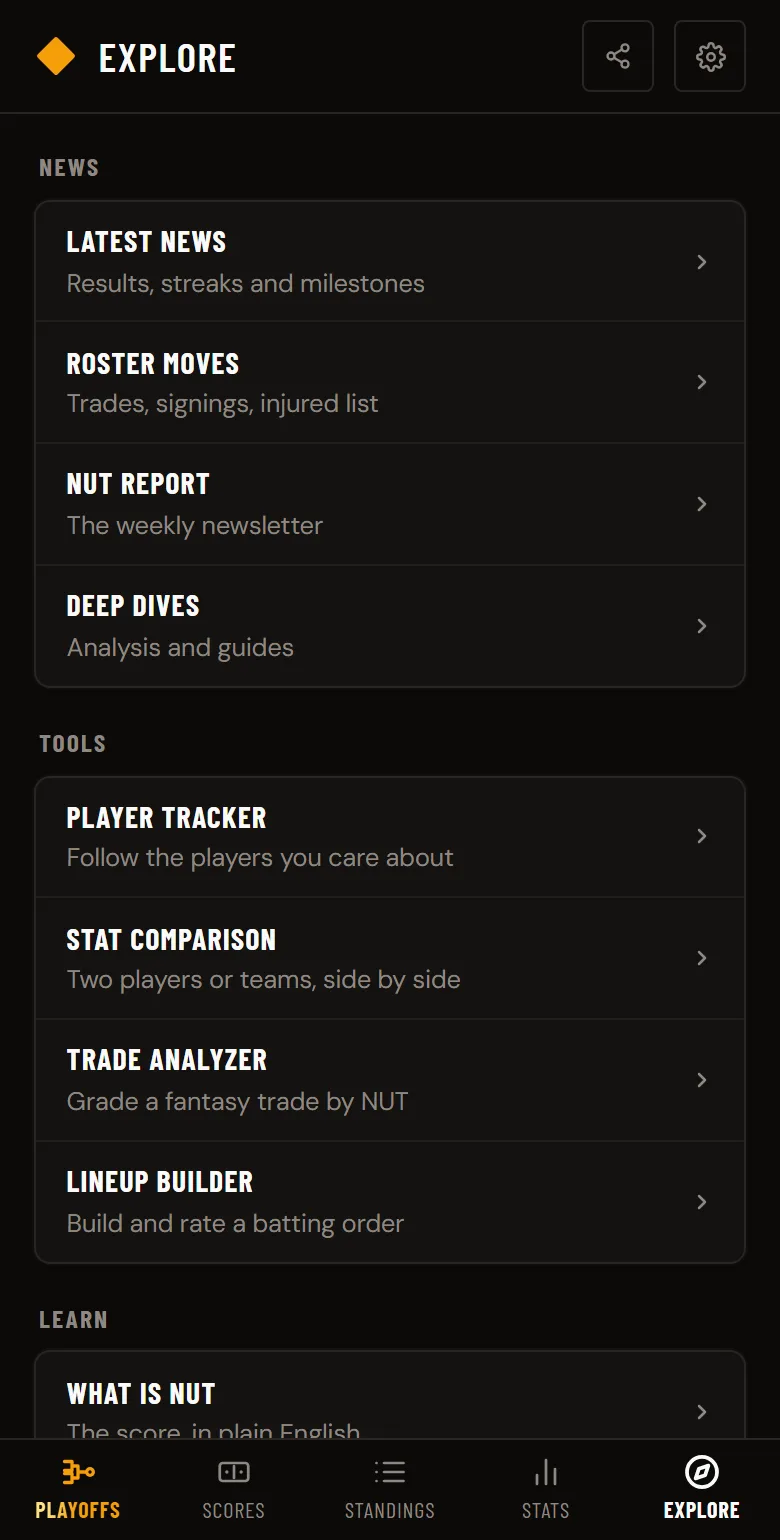
Everything else lives on the Explore tab, in three groups: News (Latest News, Roster Moves, Box Scores, and the NUT Report), Tools (Player Tracker, Stat Comparison, Trade Analyzer, Lineup Builder), and Learn (the NUT explainer, the Stats Glossary, this blog, and NUT Check). About is in the site footer. On a desktop, the same three groups open from Explore in the top bar. Each one is described in detail below.
Latest News
Latest News collects the last 7 days in MLB from the numbers, grouped by Today, Yesterday, and Earlier this week. In October, every postseason game gets its own item with the series standing and the game's top NUT performer, each morning flags the day's elimination and clinch games with both clubs' season NUT, the first day of every round lists each series' NUT edge, and the final regular-season NUT leaders stay pinned through the World Series. All season it carries series results with each series' top NUT performer, S-grade single games, team win and losing streaks of 5 or more, and career milestones. It also flags no-hitters, complete-game shutouts, 12-strikeout starts, walk-off wins, MLB debuts, the week's biggest NUT riser and faller on Mondays, and new posts from this blog. Every item carries its NUT value and links to the player, team, or game page. Filter by Results, Streaks, Milestones, or Blog; trades, call-ups and IL moves stay on Roster Moves.
Find it at the top of Explore, on your phone or in the Explore menu on desktop. Each team page also shows that club's latest items.
Hot & Cold
The Hot & Cold page ranks the last 7, 14, or 30 days by NUT accumulation, graded on the matching window. Toggle between Players and Teams, and between Hot (biggest producers) and Cold (worst slumps). For players you can also filter by All, Hitters, or Pitchers.
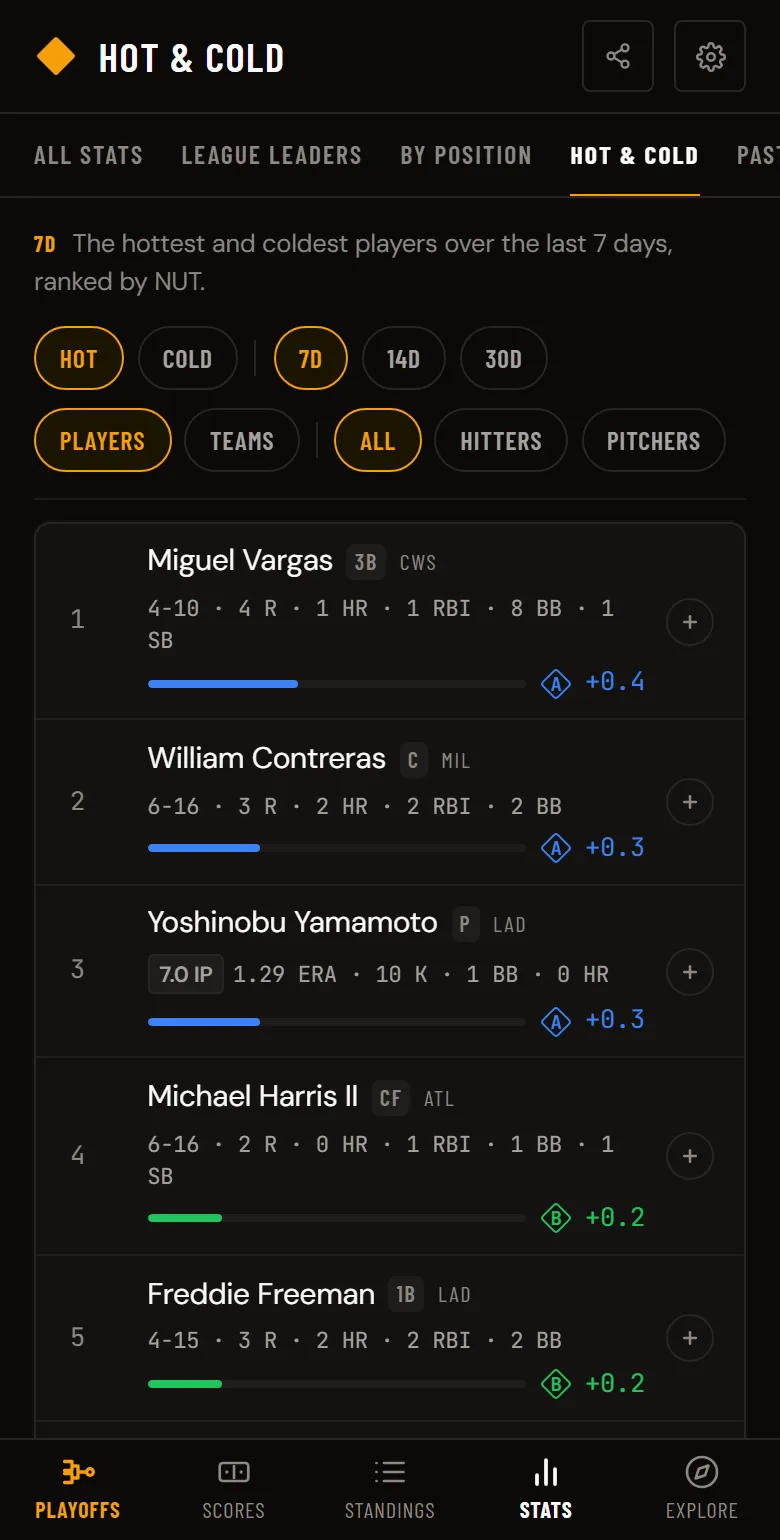
Each player shows their NUT-relevant stats — hits, home runs, walks, and HBP for hitters; strikeouts, walks, and home runs allowed for pitchers. You'll also see their at-bats or innings pitched for context, and fire emojis that scale with their NUT output.
Tap the + button next to any player to add them to your Player Tracker.
Best by Position
Best by Position ranks every qualified player at each position, catcher through relief pitcher, by season NUT. The hub shows the #1 player at all 11 positions; tap one for its full list with each player's season NUT and grade, like the best shortstops. Find it in the Stats tab, under By Position.
Every player profile also shows where that player ranks at his position, linking straight to the list.
League Leaders
League Leaders shows MLB's official top 25 in 12 stats: home runs, batting average, RBI, OPS, hits, runs, stolen bases, ERA, strikeouts, wins, saves, and WHIP. Beside each leader is his season NUT, his grade, and his rank among all qualified hitters or pitchers by NUT, so you can see which leaders are also the most productive players. Start with the home run leaders or the ERA leaders.
Past Seasons
Past Seasons covers every year since 2015. Each season page lists the top 10 hitters and pitchers by NUT, the top hitter and pitcher in each league, and all 30 teams by team NUT next to their record, using that year's league constants. See 2026 or any past year.
Team Rivalries
Team Rivalries covers 24 club matchups, from Yankees vs Red Sox to Dodgers vs Giants. Each page lists every game between the two clubs this season with the score, the season series record, both teams' team NUT side by side, and each club's top three hitters and pitchers by NUT. Every team page links to its rivalries.
Player Tracker
The Player Tracker is your personal watchlist. Add up to 40 players and monitor their season stats, NUT scores, and current status (active, injured, suspended, free agent) all in one place.
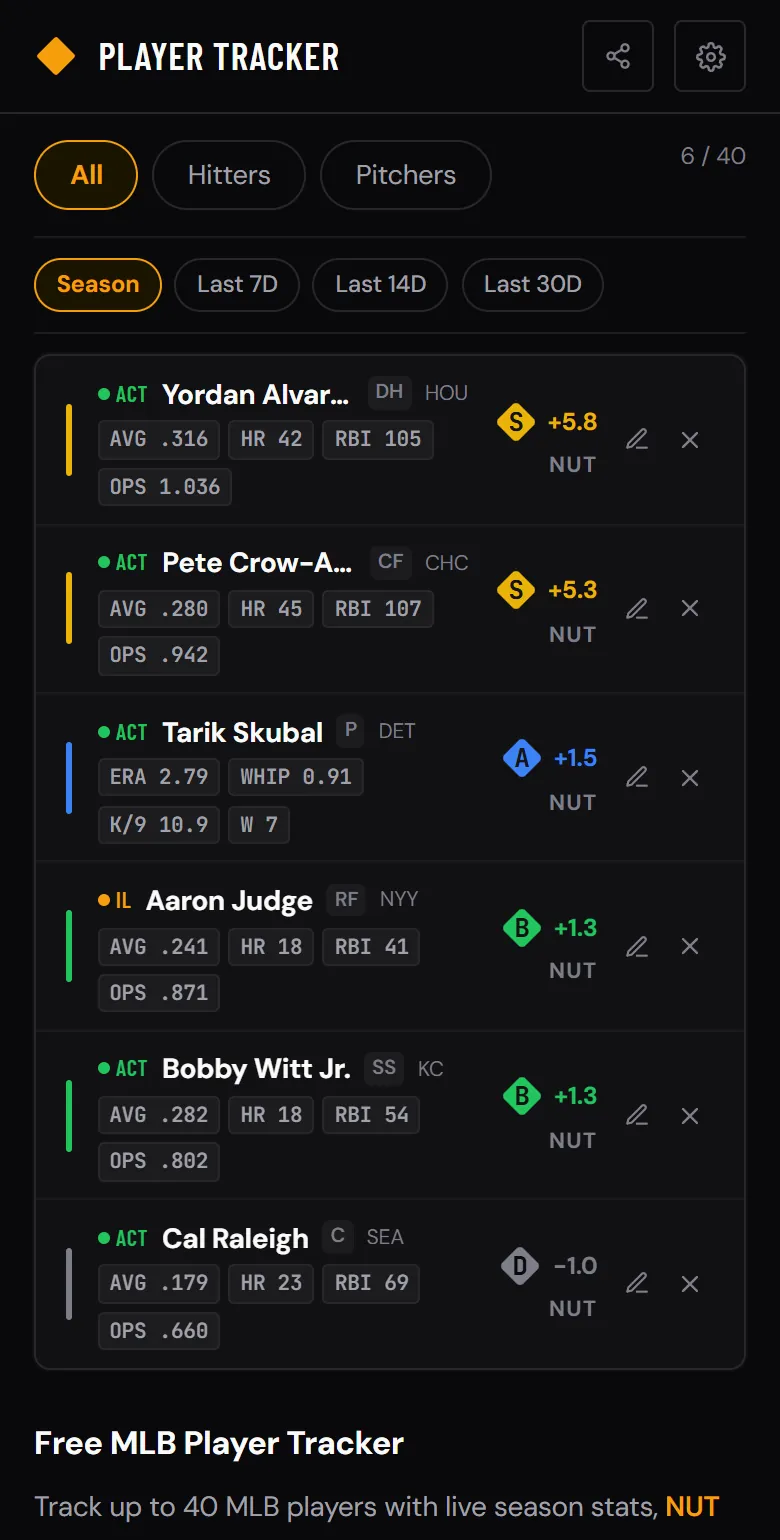
To add a player, tap the + button on the Stats page, Hot & Cold, or any player profile. Two-way players (like Shohei Ohtani) are tracked as both a hitter and pitcher automatically.
Players are sorted by NUT score by default. Filter between All, Hitters, and Pitchers if you have both on your list.
Switch the time window with the Season / Last 7D / Last 14D / Last 30D pills at the top — stats and NUT recompute over the selected window, so your hottest players over the last week or month rise to the top automatically.
Tap the pencil icon next to any player to add a personal note (up to 280 characters) — handy for things like "hot bat," "watch K rate," or "IL stash." Notes save with the rest of your watchlist.
No account required. Your watchlist saves locally on your device.
Stat Comparison
The comparison tool lets you pick any two MLB players and see their stats side-by-side. Every category is compared head-to-head with the leader highlighted in bold, and you'll see each player's NUT Score at the top. Use the year dropdown to compare specific seasons or career totals — you can even compare Judge's 2022 MVP season against Ohtani's 2023. Career comparisons include awards like World Series titles, MVPs, All-Star selections, and more. Expand the Head-to-Head card for a written breakdown of how the two players stack up. Share any comparison with the Share button.
For the debates people have most, there are ready-made matchup pages with season and career NUT side by side, like Judge vs Ohtani and Skenes vs Skubal. All of them are listed on the comparison page, and each player profile links to the matchups that include him.
Fantasy Trade Analyzer
The trade analyzer helps you evaluate fantasy baseball trades. Add up to 5 players to each side — each side holds the players it gives up, so the tool projects every player's rest-of-season NUT and names the side receiving the more valuable package as the winner. It projects a full-season NUT for each player (last year's production blended with this season's pace, weighted toward current form as games pile up), then takes the share still left on the MLB schedule — so the projection naturally shrinks as the season winds down. Both hitters and pitchers are measured on the same NUT scale, so you can compare across positions, and a confidence readout flags how much playing time the projection rests on.
Shortcut: on the Roster Moves page, every trade has an Analyze trade button that opens the analyzer with both sides already filled in from the real deal.
Lineup Builder
The Lineup Builder generates an optimal 9-spot batting order from any group of hitters. Enter players three ways: type them in manually, paste or upload a CSV (Name, AVG, OBP, SLG columns), or search and pull real MLB players' current stats directly. The tool slots your best on-base hitters at the top and your best power bats in the middle, benching whoever doesn't make the cut — useful for fantasy lineup decisions or just settling an argument about who should be hitting leadoff.
Daily NUT Check
NUT Check is a daily trivia game built into the app. Each round shows two choices; pick the one with the higher NUT. All 10 rounds count, and everyone gets the same puzzle. Weekdays use 2000s–2020s players, Saturdays a throwback decade, and Sundays players from every era. Free Play opens all 13 decades from the 1900s.
Baseball Stats Glossary
Not sure what OPS, wOBA, or FIP mean? The Glossary explains every baseball stat in plain English — with formulas, benchmarks, and how each stat connects to NUT Score. 35 stats have their own deep-dive pages with benchmarks and related stats.
You don't have to leave the page you're on, either. Hover any stat abbreviation in a table header or leaderboard pill for its plain-English definition, follow the Stat definitions link under any stat table, or tap the ? next to NUT on the scoreboard, stats, and compare pages for a one-line explanation right where you are.
The NUT Report (Weekly Newsletter)
Every Monday, we send the NUT Report — a free weekly email with the top NUT hitters and pitchers, coldest players, and what the numbers reveal about the week. Subscribe from anywhere in the app or at the bottom of any page.
Spoiler Mode
Recording a game to watch later? Turn on Spoiler Mode in Settings and all final scores and live scores on the scoreboard are hidden behind a blur.
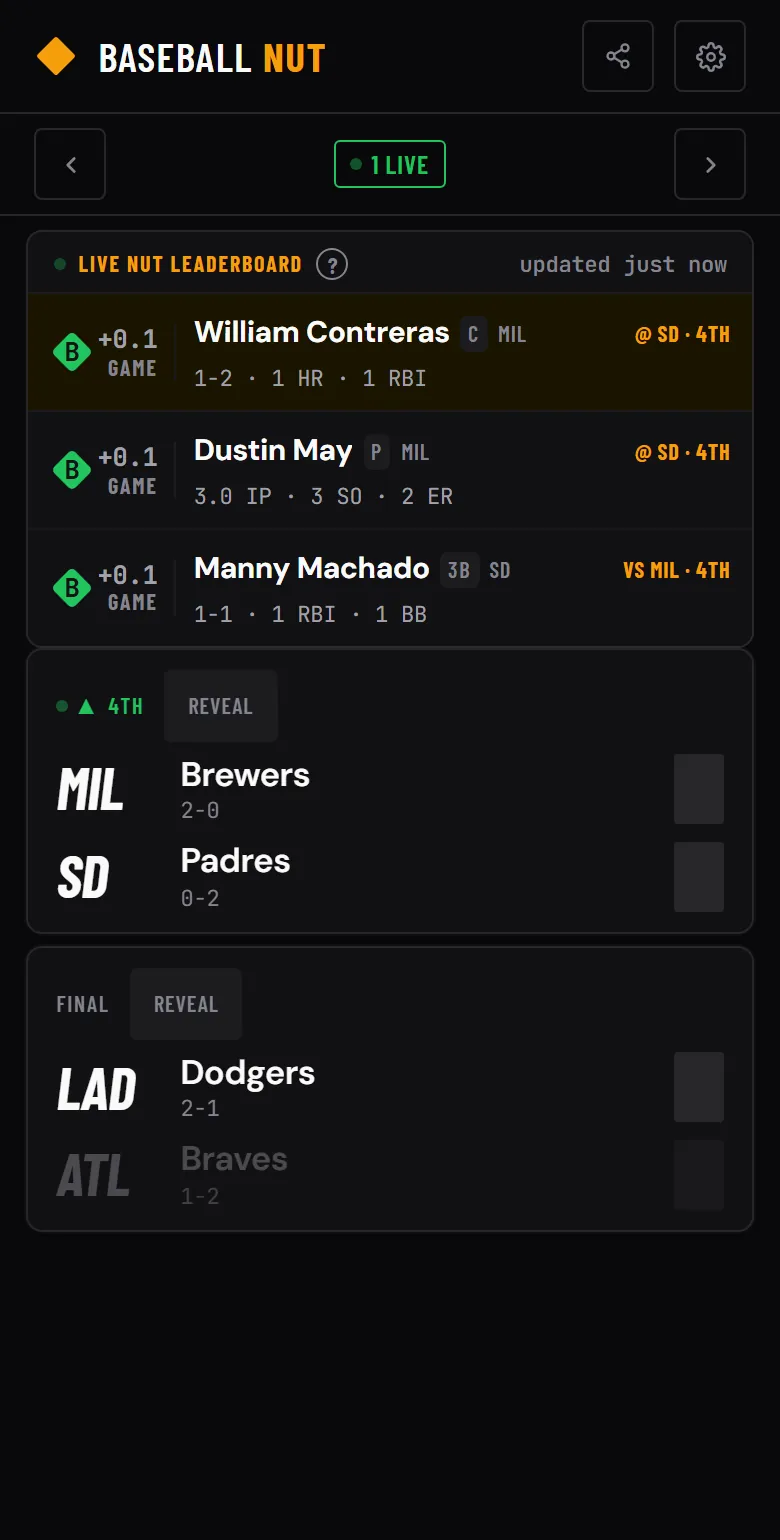
When you're ready to see a specific game's score, tap the "Reveal" button on that card. You can also toggle Spoiler Mode on/off in Settings, and it persists across sessions.
Settings
Tap the gear icon in the top right to access Settings. From here you can:
- Toggle Spoiler Mode to hide final scores until you're ready
- Switch between Dark, Light, and System themes
- Change the accent color (14 options)
- Adjust the display size to make everything larger or smaller
- Toast notifications confirm your actions — favoriting teams, tracking players, changing settings
- Install Baseball NUT as a PWA on your phone's home screen
Install on Your Phone
Baseball NUT works in any browser, but you can also install it as an app on your home screen for a full-screen, app-like experience. On iPhone, tap the share button in Safari and select "Add to Home Screen." On Android, tap the three-dot menu in Chrome and select "Install app" or "Add to Home screen."
Questions?
Reach out anytime at hello@baseballnut.app or on X at @BaseballNutApp.