Player Tracker Guide — How to Monitor Your Favorite MLB Players
Following individual players across a 162-game season is hard. Box scores are scattered across apps. Injury updates live on Twitter. Fantasy tools want your credit card. The Player Tracker on Baseball NUT solves this by putting every player you care about into a single watchlist with real-time stats, NUT scores, and status indicators.
No account required. No ads. Your watchlist saves locally on your device and updates automatically throughout the season. Here's everything the Player Tracker does and how to get the most out of it.
What the Tracker Looks Like
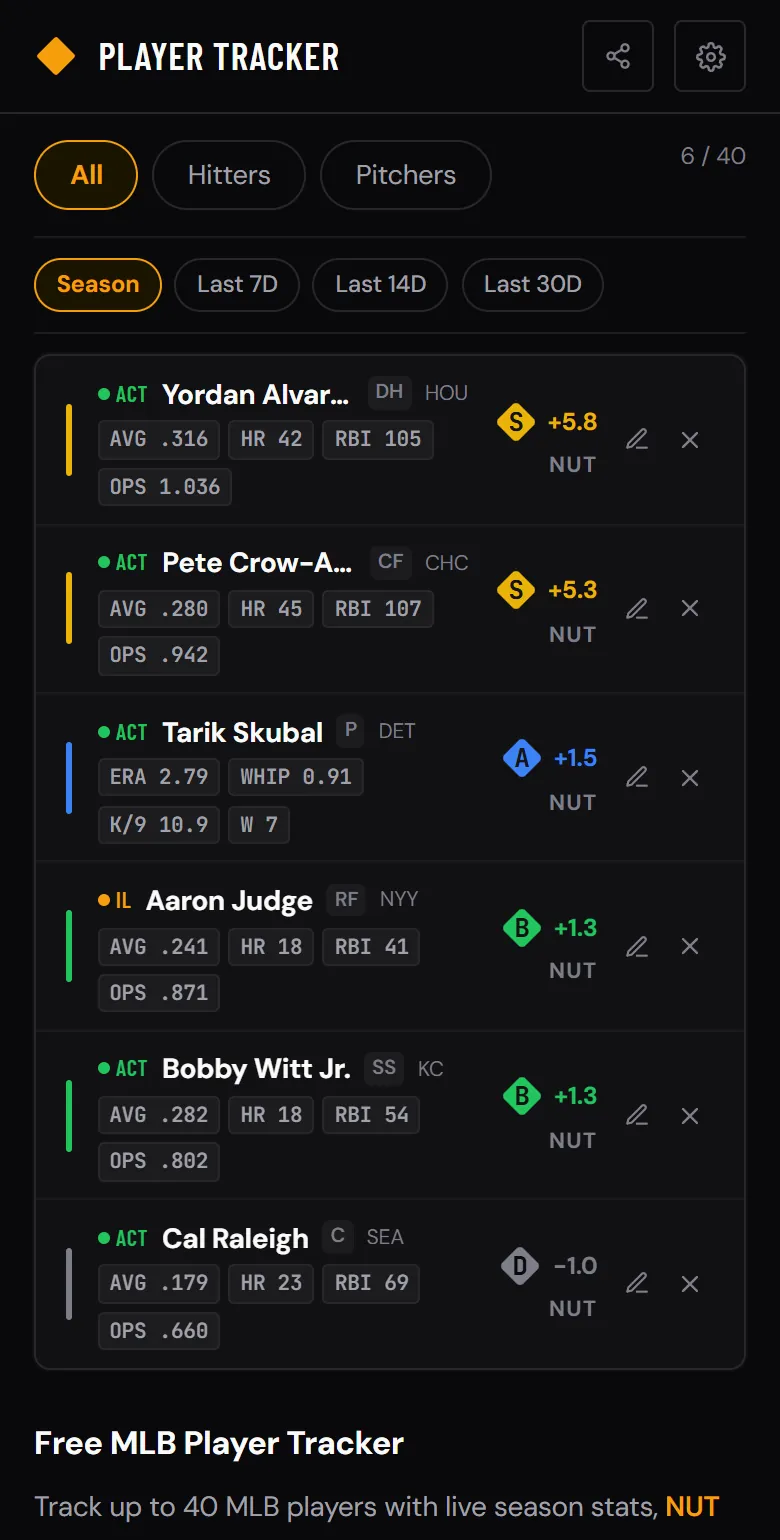
Each player card shows their current NUT score, key stat pills, position, team, and roster status. Players are automatically sorted by NUT score — your most valuable players always float to the top.
Sample watchlist showing hitters and pitchers with NUT scores, stat pills, and status indicators.
Status Indicators at a Glance
Each player card shows a color-coded dot next to their name so you can instantly see who's available, who's playing right now, and who's on the shelf. This matters for fantasy lineup decisions and for knowing when your tracked players are actually contributing.
Understanding the NUT Tier Scale
Every player in the tracker gets a colored bar that reflects their NUT tier. The NUT score measures how much production a player adds (or costs) their team compared to a league-average player. Here's how the tiers break down so you can read the tracker at a glance.
How to Add and Manage Players
Building your watchlist takes seconds. You can add players from multiple places throughout the app. Here's the full workflow.
Stats on Every Card
The tracker shows different stat pills depending on whether a player is a hitter or pitcher. These are the numbers that matter most for evaluating current-season performance without leaving the watchlist.
Hitter Stats
Pitcher Stats
Who the Tracker Is For
The Player Tracker works for any fan who follows specific players rather than just teams. Here are four common use cases.
Tracking Two-Way Players
Two-way players like Shohei Ohtani present a unique challenge — they produce value both at the plate and on the mound. The Player Tracker handles this by letting you add a two-way player as a hitter, as a pitcher, or both. Each entry gets its own NUT score and stat pills specific to that role.
This is especially useful in fantasy leagues that roster Ohtani as a hitter and pitcher separately. Track both roles and see exactly how much value he's generating in each one.
Works with Every Other Tool
The Player Tracker connects to the rest of Baseball NUT. Tap any tracked player to open their full profile — five tabs covering Season (expected vs actual, percentile rankings), Trends (game log, rolling NUT avg), Splits (L/R, Home/Away, Day/Night, by count), Zones (hot/cold zones, spray chart, pitch mix), and Career stats. Spot two players worth comparing? Open the Stat Comparison tool directly. Evaluating a fantasy deal? Pull tracked players into the Trade Analyzer. See a roster move? Check the Transactions page to see every trade, call-up, and IL move across the league.
You can also add players to your tracker from the Hot & Cold page — one tap on the + button while browsing the hottest hitters and pitchers of the week.
Tips for Getting the Most Out of the Tracker
Use the filter tabs
When your watchlist grows past 15-20 players, the All / Hitters / Pitchers filter tabs help you focus. Check your pitchers before setting your fantasy lineup on start days. Review hitters when evaluating trade packages.
Watch the NUT sort order
Players automatically sort by NUT score, highest first. If a player you expected to perform well keeps sinking in your list, that's a signal. Their production is falling behind, and it might be time to bench, trade, or drop them.
Monitor IL players for return timelines
Don't remove injured players from the tracker — the red IL indicator reminds you they exist. When their status flips back to Active, you'll see it immediately and can adjust your roster.
Pair with the NUT leaderboard
The Stats page ranks every MLB player by NUT. If a player on the leaderboard isn't in your tracker yet, they might be worth adding — especially if they're a free agent in your fantasy league.
Frequently Asked Questions
How many players can I track?
Up to 40 players at a time. That's enough for a full fantasy roster plus a dozen watch-list targets. Remove a player anytime to free up a slot.
Do I need an account?
No. The tracker uses your browser's localStorage, so your watchlist persists between sessions without any sign-up or email. It works on any device with a browser and installs as a progressive web app on your phone's home screen.
Can I track two-way players?
Yes. Two-way players can be added as a hitter, a pitcher, or both. Each role gets its own NUT score and stat pills so you can evaluate their hitting and pitching contributions independently.
What statuses does the tracker show?
Five types: Active (on the roster), Playing (in today's game), Injured (IL), Suspended, and Free Agent. Each status has a color-coded dot so you can scan availability at a glance.
The Player Tracker is free and works on any device. Start building your watchlist now and monitor your favorite players all season.