Fantasy Baseball Trade Analyzer — How to Evaluate Every Deal with NUT Score
Every fantasy baseball manager has been there: someone sends a trade offer and you have no idea if it's fair. You check rankings, skim recent stats, ask your group chat. None of it gives you a definitive answer.
The Trade Analyzer solves that. Drop players on each side, and it shows you the projected rest-of-season NUT Score for both. One production number for every player. The side with more projected NUT wins the trade.
No guessing, no gut feels. Here's how it works and how to use it to win more trades.
How the Trade Analyzer Works
The tool has two sides: “You Give” and “You Get.” You can add up to 5 players per side. Search any MLB player by name and the tool pulls their current-season NUT along with a rest-of-season (ROS) projection. The totals update instantly so you can see which side of the deal comes out ahead.
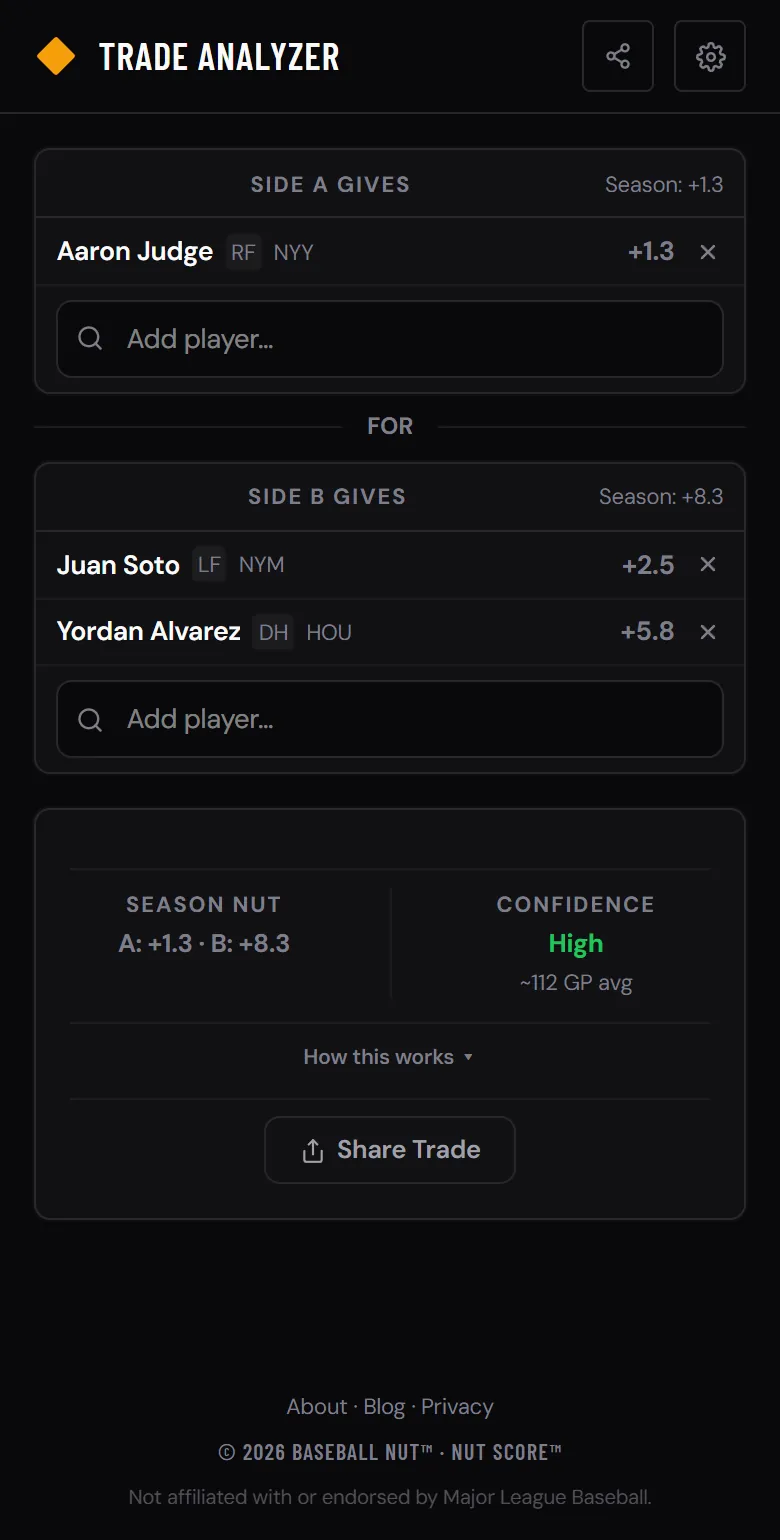
Every trade you build is shareable. The player IDs are encoded in the URL, so you can send the link to your leaguemates or save it for later. No account needed.
Step-by-Step: Evaluating a Trade
That's it. Five steps, takes about 30 seconds. Every player in the MLB is searchable, and each one links to their full profile page if you want to dig deeper into their stats.
Sample Trade: Seeing the NUT Difference
Imagine someone offers you this deal. At first glance it looks reasonable — two productive hitters for two productive hitters. But the NUT projections tell a different story.
Without NUT, this trade looks like a coin flip. With it, you can see that the “You Get” side projects for a 1.2 NUT edge in production over the rest of the season. That's the difference between winning your league and finishing second.
Why NUT Beats Traditional Stats for Trade Evaluation
Most fantasy managers evaluate trades using batting average, home runs, and ERA. Those stats tell you something, but they leave out critical context. NUT captures what traditional stats miss.
How ROS Projections Work
The Trade Analyzer doesn't just show you what a player has done — it projects what they'll do for the rest of the season. The ROS projection blends two inputs: the player's current 2026 pace and their previous season's production.
This matters because early-season stats are noisy. A player hitting .380 in April with 15 games played probably isn't a .380 hitter. The blend protects you from overreacting to small samples while still rewarding real breakouts as the data grows.
The projections also use total season value, not per-game rates. A player who produced +3.0 NUT over 140 games last year projects as roughly a +3.0 player, not a +6.0 player over a hypothetical 280 games. Durability is baked in — a player who stays healthy is more valuable than one who dominates for 60 games and sits out the rest.
Trade Red Flags to Watch For
The NUT totals tell you who wins the trade on paper. But there are warning signs the raw numbers don't always surface. Watch for these before you hit accept.
Pair the Trade Analyzer with Other Tools
The Trade Analyzer works best when you combine it with the other tools on Baseball NUT. Before accepting any deal, run through this checklist.
Check the player profiles. Every player in the Trade Analyzer links to their profile page with five tabs: Season (expected vs actual, percentile rankings), Trends (game log, rolling NUT avg, NUT by month), Splits (L/R, Home/Away, by count), Zones (hot/cold zones, spray chart, exit velo scatter), and Career (year-by-year stats, NUT breakdown, milestones). Check the Trends tab to see if they're trending up or down.
Use Player Compare. The Stat Comparison tool lets you stack two players side by side with full stat tables. If you're deciding between two targets in a trade, compare them head-to-head before picking one.
Check Hot & Cold. Before trading for a player, see if they show up on the Hot & Cold page. If they're trending down, you might want to wait — their owner could get desperate and offer a better deal later.
When to Pull the Trigger
Not every trade with a positive NUT edge is worth making. A +0.2 NUT difference is within noise — you're essentially swapping equals. Look for trades where the gap is meaningful.
The Bottom Line
Fantasy trades are won and lost on information. Your leaguemates are eyeballing batting averages and going with their gut. You have a tool that converts every player's production into one projected number and shows you the math.
Use the Trade Analyzer every time someone sends you an offer. Use it when you're building an offer of your own. Share the link so the other manager can see the numbers too — sometimes the best way to close a deal is to show them the data.
It's free, works on your phone, and updates after every game. Open the Trade Analyzer →